
Maths Gcse Wjec-Eduqas Foundation
-
Scatter-Graphs-And-Correlation Wjec-Eduqas Foundation2 主题
-
Statistical-Diagrams- Wjec-Eduqas Foundation7 主题
-
Comparing-Statistical-Diagrams Wjec-Eduqas Foundation
-
Reading-And-Interpreting-Statistical-Diagrams Wjec-Eduqas Foundation
-
Time-Series-Graphs- Wjec-Eduqas Foundation
-
Pie-Charts- Wjec-Eduqas Foundation
-
Frequency-Polygons Wjec-Eduqas Foundation
-
Bar-Charts-And-Pictograms- Wjec-Eduqas Foundation
-
Tally-Charts-And-Frequency-Tables Wjec-Eduqas Foundation
-
Comparing-Statistical-Diagrams Wjec-Eduqas Foundation
-
Statistics-Toolkit Wjec-Eduqas Foundation8 主题
-
Questionnaires Wjec-Eduqas Foundation
-
Population-And-Sampling Wjec-Eduqas Foundation
-
Comparing-Data-Sets- Wjec-Eduqas Foundation
-
Range Wjec-Eduqas Foundation
-
Averages-From-Grouped-Data Wjec-Eduqas Foundation
-
Averages-From-Tables- Wjec-Eduqas Foundation
-
Calculations-With-The-Mean Wjec-Eduqas Foundation
-
Mean-Median-And-Mode Wjec-Eduqas Foundation
-
Questionnaires Wjec-Eduqas Foundation
-
Tree-Diagrams-And-Combined-Probability Wjec-Eduqas Foundation2 主题
-
Simple-Probability-Diagrams- Wjec-Eduqas Foundation4 主题
-
Probability-Toolkit Wjec-Eduqas Foundation3 主题
-
Transformations Wjec-Eduqas Foundation4 主题
-
Vectors Wjec-Eduqas Foundation3 主题
-
Pythagoras-And-Trigonometry Wjec-Eduqas Foundation5 主题
-
Congruence-Similarity-And-Geometrical-Proof Wjec-Eduqas Foundation5 主题
-
Volume-And-Surface-Area- Wjec-Eduqas Foundation3 主题
-
Circles-Arcs-And-Sectors Wjec-Eduqas Foundation3 主题
-
Area-And-Perimeter Wjec-Eduqas Foundation4 主题
-
Bearings-Scale-Drawing-Constructions-And-Loci- Wjec-Eduqas Foundation5 主题
-
2D-And-3D-Shapes Wjec-Eduqas Foundation4 主题
-
Angles-In-Polygons-And-Parallel-Lines Wjec-Eduqas Foundation5 主题
-
Geometry-Toolkit Wjec-Eduqas Foundation4 主题
-
Exchange-Rates-And-Best-Buys Wjec-Eduqas Foundation2 主题
-
Standard-And-Compound-Units- Wjec-Eduqas Foundation5 主题
-
Direct-And-Inverse-Proportion- Wjec-Eduqas Foundation1 主题
-
Ratio-Problem-Solving- Wjec-Eduqas Foundation2 主题
-
Ratio-Toolkit Wjec-Eduqas Foundation3 主题
-
Sequences Wjec-Eduqas Foundation4 主题
-
Solving-Inequalities- Wjec-Eduqas Foundation3 主题
-
Real-Life-Graphs Wjec-Eduqas Foundation4 主题
-
Graphs-Of-Functions Wjec-Eduqas Foundation3 主题
-
Linear-Graphs Wjec-Eduqas Foundation3 主题
-
Coordinate-Geometry Wjec-Eduqas Foundation3 主题
-
Functions Wjec-Eduqas Foundation1 主题
-
Forming-And-Solving-Equations Wjec-Eduqas Foundation2 主题
-
Simultaneous-Equations Wjec-Eduqas Foundation1 主题
-
Solving-Quadratic-Equations- Wjec-Eduqas Foundation1 主题
-
Linear-Equations Wjec-Eduqas Foundation3 主题
-
Algebraic-Reasoning Wjec-Eduqas Foundation1 主题
-
Rearranging-Formulae Wjec-Eduqas Foundation1 主题
-
Factorising Wjec-Eduqas Foundation3 主题
-
Expanding-Brackets Wjec-Eduqas Foundation2 主题
-
Algebraic-Roots-And-Indices Wjec-Eduqas Foundation1 主题
-
Algebra-Toolkit Wjec-Eduqas Foundation4 主题
-
Using-A-Calculator Wjec-Eduqas Foundation1 主题
-
Exact-Values Wjec-Eduqas Foundation1 主题
-
Rounding-Estimation-And-Error-Intervals Wjec-Eduqas Foundation4 主题
-
Fractions-Decimals-And-Percentages Wjec-Eduqas Foundation2 主题
-
Simple-And-Compound-Interest-Growth-And-Decay Wjec-Eduqas Foundation4 主题
-
Percentages Wjec-Eduqas Foundation5 主题
-
Fractions Wjec-Eduqas Foundation6 主题
-
Multiplying-And-Dividing-Fractions Wjec-Eduqas Foundation
-
Adding-And-Subtracting-Fractions- Wjec-Eduqas Foundation
-
Mixed-Numbers-And-Improper-Fractions Wjec-Eduqas Foundation
-
Equivalent-And-Simplified-Fractions Wjec-Eduqas Foundation
-
Fractions-Of-Amounts Wjec-Eduqas Foundation
-
Introduction-To-Fractions Wjec-Eduqas Foundation
-
Multiplying-And-Dividing-Fractions Wjec-Eduqas Foundation
-
Powers-Roots-And-Standard-Form Wjec-Eduqas Foundation4 主题
-
Types-Of-Number-Prime-Factors-Hcf-And-Lcm- Wjec-Eduqas Foundation6 主题
-
Number-Toolkit Wjec-Eduqas Foundation9 主题
-
Counting-Principles Wjec-Eduqas Foundation
-
Related-Calculations- Wjec-Eduqas Foundation
-
Multiplication-And-Division Wjec-Eduqas Foundation
-
Addition-And-Subtraction Wjec-Eduqas Foundation
-
Money-Calculations- Wjec-Eduqas Foundation
-
Negative-Numbers- Wjec-Eduqas Foundation
-
Place-Value Wjec-Eduqas Foundation
-
Order-Of-Operations-Bidmasbodmas Wjec-Eduqas Foundation
-
Mathematical-Operations Wjec-Eduqas Foundation
-
Counting-Principles Wjec-Eduqas Foundation
Enlargements Wjec-Eduqas Foundation
Exam code:C300
Enlargements
What is an enlargement?
-
An enlargement changes the size and position of a shape
-
The length of each side of the shape is multiplied by a scale factor
-
If the scale factor is greater than 1 then the enlarged image will be bigger than the original object
-
If the scale factor is less than 1 then the enlarged image will be smaller than the original object
-
-
The centre of enlargement determines the position of the enlarged image
-
If the scale factor is greater than 1 then the enlarged image will be further away from the centre of enlargement
-
If the scale factor is less than 1 then the enlarged image will be closer to the centre of enlargement
-
How do I enlarge a shape?
-
STEP 1
Pick a vertex of the shape and count the horizontal and vertical distances from the centre of enlargement
-
STEP 2
Multiply both the horizontal and vertical distances by the given scale factor -
STEP 3
Start at the centre of enlargement and measure the new distances to find the enlarged vertex -
STEP 4
Repeat the steps for the other vertices-
You might be able to draw the enlarged shape from the first vertex by multiplying the original lengths by the scale factor
-
This can be done quickly if the shape is made up of vertical and horizontal lines
-
-
-
STEP 5
Connect the vertices on the enlarged image and label it
How do I describe an enlargement?
-
To describe an enlargement, you must:
-
State that the transformation is an enlargement
-
State the scale factor
-
Give the coordinates of the centre of enlargement
-
-
To find the scale factor:
-
Pick a side of the original shape
-
Identify the corresponding side on the enlarged image
-
Divide the length of the enlarged side by the length of the original side
-
-
To find the centre of enlargement:
-
Pick a vertex of the original shape
-
Identify the corresponding vertex on the enlarged image
-
Draw a line going through these two vertices
-
Repeat this for the other vertices of the original shape
-
These lines will intersect at the centre of enlargement
-
How do I reverse an enlargement?
-
If a shape has been enlarged, you can perform a single transformation to return the shape to its original size and position
-
An enlargement can be reversed by multiplying the enlarged shape by the reciprocal of the original scale factor
-
The centre of enlargement is the same
-
-
For a shape enlarged by a scale factor of 3 with centre of enlargement (-1, 6)
-
The reverse transformation is
-
an enlargement of scale factor

-
with centre of enlargement (-1, 6)
-
-
Examiner Tips and Tricks
-
To check that you have enlarged a shape correctly:
-
Draw lines going from the centre of enlargement to each of the vertices of the original shape
-
Extend these lines
-
The lines should go through the corresponding vertices of the enlarged image
-
Worked Example
(a) On the grid below enlarge shape C using scale factor 2 and centre of enlargement (2, 1).
Label your enlarged shape C’.
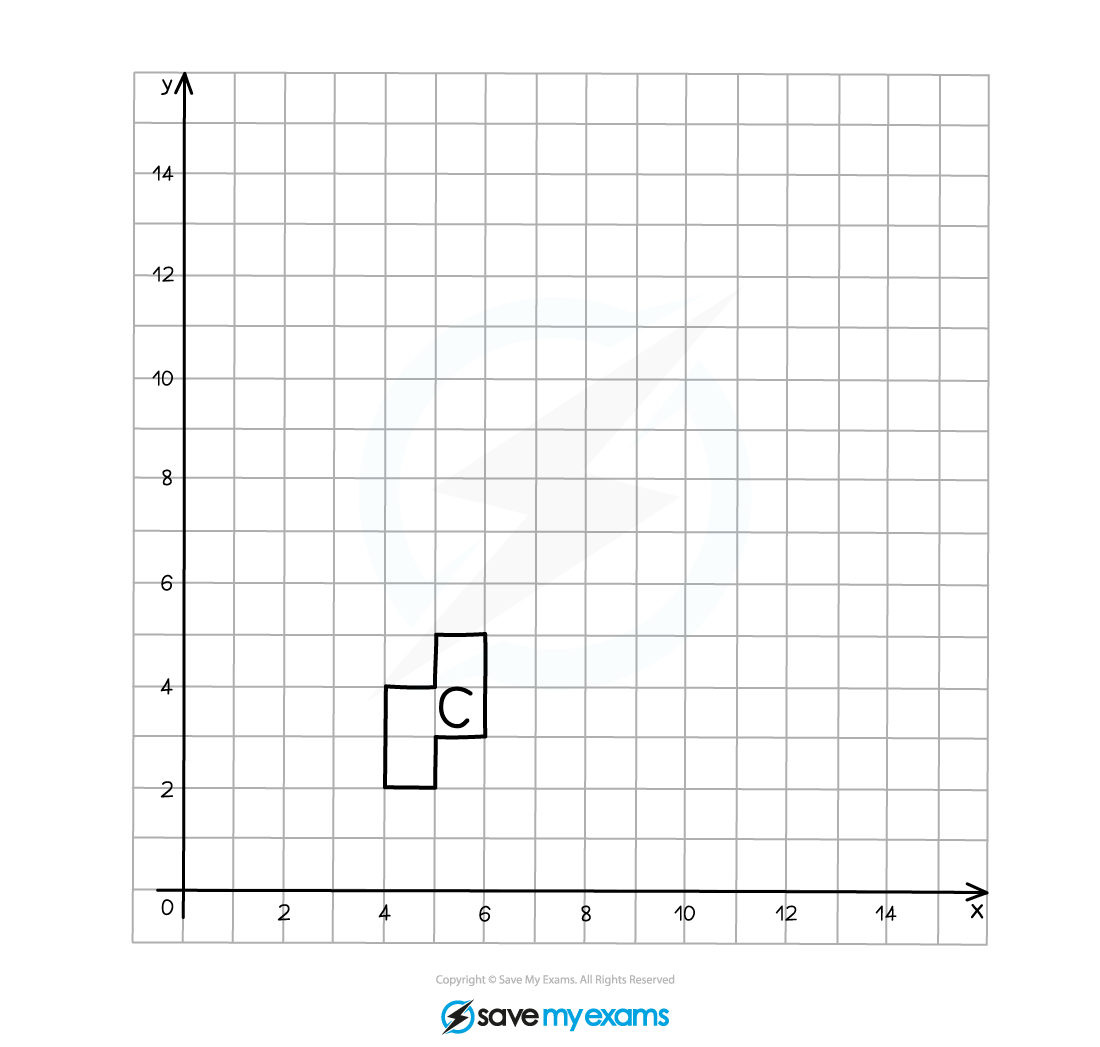
Start by marking on the centre of enlargement (CoE).
Count the number of squares in both a horizontal and vertical direction to go from the CoE to one of the vertices on the original object, this is 2 to the right and 3 up in this example.
As the scale factor is 2, multiply these distances by 2, so they become 4 to the right and 6 up.
Count these new distances from the CoE to the corresponding point on the enlarged image and mark it on.
Draw a line through the CoE and the pair of corresponding points, they should line up in a straight line.
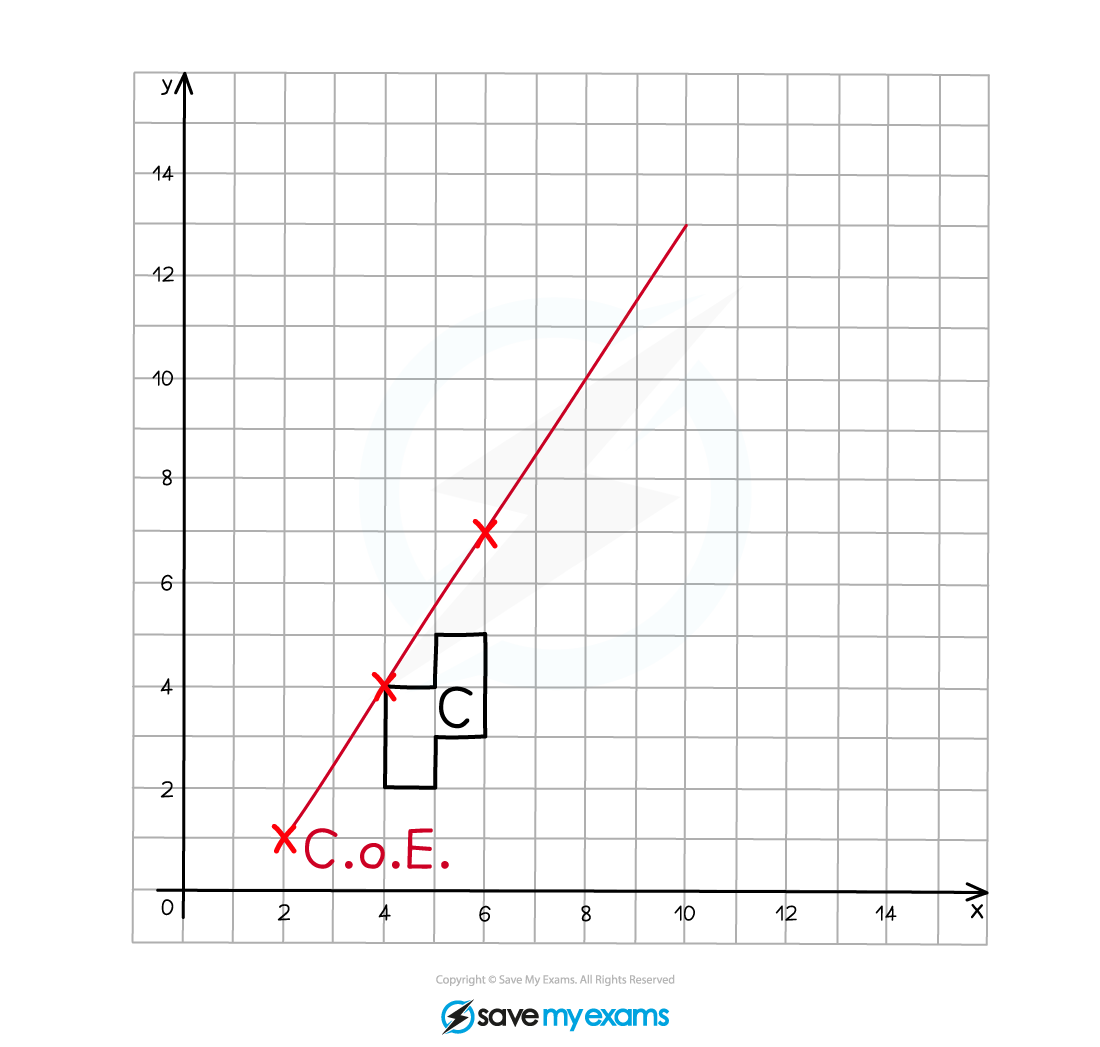
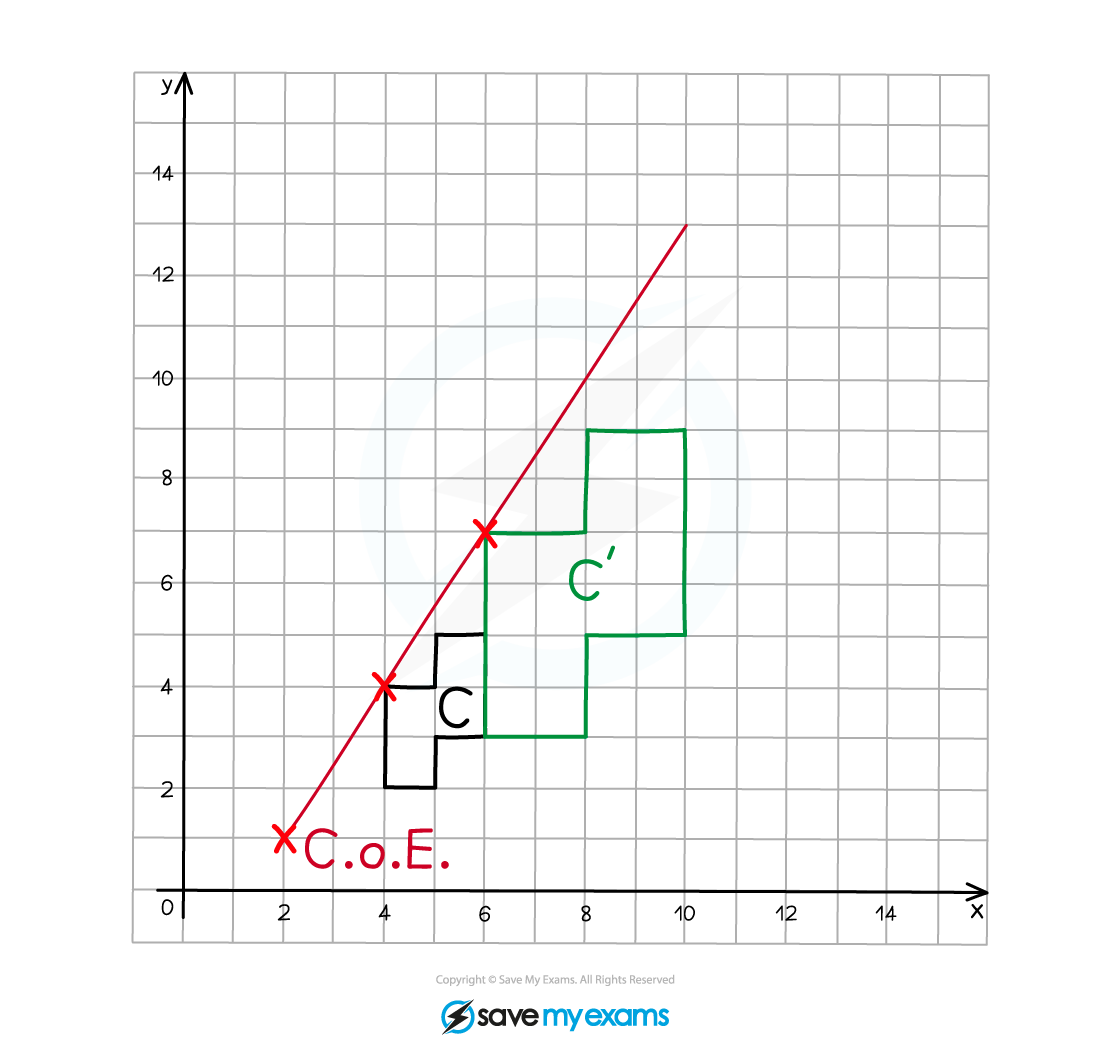
Repeat this process for each of the vertices on the original object (or at least 2).
Join adjacent vertices on the enlarged image as you go.
Label the enlarged image C’.
(b) Describe fully the single transformation that creates shape B from shape A.
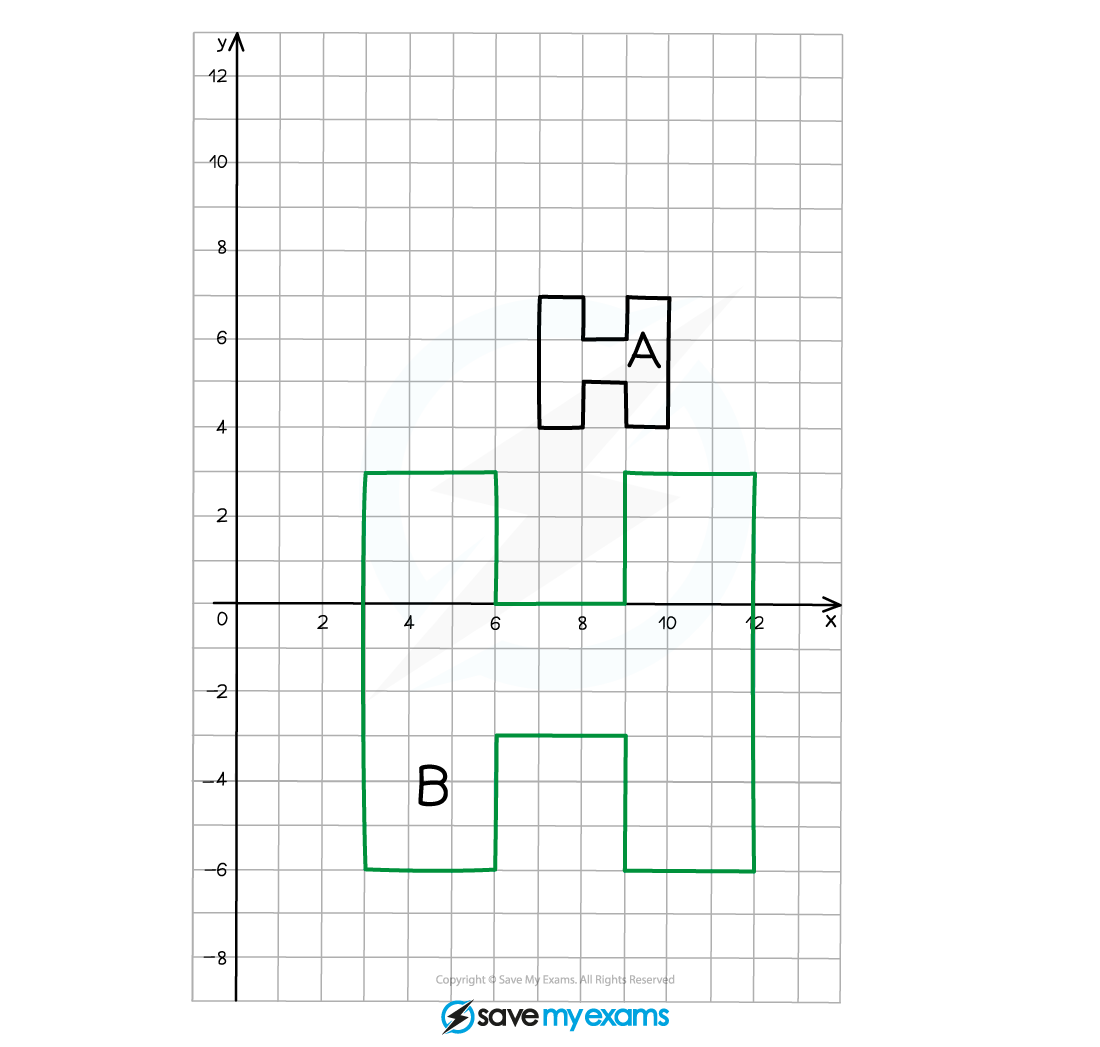
We can see that the image is larger than the original object, therefore it must be an enlargement.
As the enlarged image is bigger than the original object, the scale factor must be greater than 1.
Compare two corresponding edges on the object and the image to find the scale factor.
The height of the original “H” is 3 squares
The height of the enlarged “H” is 9 squares
<img alt=”therefore Scale space Factor space equals 9 over 3 equals 3″ data-mathml='<math ><semantics><mrow><mo >∴</mo><mi >Scale</mi><mo > </mo><mi >Factor</mi><mo > </mo><mo >=</mo><mfrac ><mn>9</mn><mn>3</mn></mfrac><mo >=</mo><mn >3</mn></mrow><annotation encoding=”application/vnd.wiris.mtweb-params+json”>{“language”:”en”,”fontFamily”:”Times New Roman”,”fontSize”:”18″,”autoformat”:true}</annotation></semantics></math>’ data-type=”working” height=”47″ role=”math” src=”data:image/svg+xml;charset=utf8,%3Csvg%20xmlns%3D%22http%3A%2F%2Fwww.w3.org%2F2000%2Fsvg%22%20xmlns%3Awrs%3D%22http%3A%2F%2Fwww.wiris.com%2Fxml%2Fmathml-extension%22%20height%3D%2247%22%20width%3D%22171%22%20wrs%3Abaseline%3D%2230%22%3E%3C!–MathML%3A%20%3Cmath%20xmlns%3D%22http%3A%2F%2Fwww.w3.org%2F1998%2FMath%2FMathML%22%3E%3Cmo%20mathcolor%3D%22%23000000%22%3E%26%23×2234%3B%3C%2Fmo%3E%3Cmi%20mathcolor%3D%22%23000000%22%3EScale%3C%2Fmi%3E%3Cmo%20mathcolor%3D%22%23000000%22%3E%26%23xA0%3B%3C%2Fmo%3E%3Cmi%20mathcolor%3D%22%23000000%22%3EFactor%3C%2Fmi%3E%3Cmo%20mathcolor%3D%22%23000000%22%3E%26%23xA0%3B%3C%2Fmo%3E%3Cmo%20mathcolor%3D%22%23000000%22%3E%3D%3C%2Fmo%3E%3Cmfrac%20mathcolor%3D%22%23000000%22%3E%3Cmn%3E9%3C%2Fmn%3E%3Cmn%3E3%3C%2Fmn%3E%3C%2Fmfrac%3E%3Cmo%20mathcolor%3D%22%23000000%22%3E%3D%3C%2Fmo%3E%3Cmn%20mathcolor%3D%22%23000000%22%3E3%3C%2Fmn%3E%3C%2Fmath%3E–%3E%3Cdefs%3E%3Cstyle%20type%3D%22text%2Fcss%22%3E%40font-face%7Bfont-family%3A’math1f0b57a9ccae93e289fb2a26cc8’%3Bsrc%3Aurl(data%3Afont%2Ftruetype%3Bcharset%3Dutf-8%3Bbase64%2CAAEAAAAMAIAAAwBAT1MvMi7iBBMAAADMAAAATmNtYXDEvmKUAAABHAAAADxjdnQgDVUNBwAAAVgAAAA6Z2x5ZoPi2VsAAAGUAAABL2hlYWQQC2qxAAACxAAAADZoaGVhCGsXSAAAAvwAAAAkaG10eE2rRkcAAAMgAAAADGxvY2EAHTwYAAADLAAAABBtYXhwBT0FPgAAAzwAAAAgbmFtZaBxlY4AAANcAAABn3Bvc3QB9wD6AAAE%2FAAAACBwcmVwa1uragAABRwAAAAUAAADSwGQAAUAAAQABAAAAAAABAAEAAAAAAAAAQEAAAAAAAAAAAAAAAAAAAAAAAAAAAAAAAAAAAAAACAgICAAAAAg1UADev96AAAD6ACWAAAAAAACAAEAAQAAABQAAwABAAAAFAAEACgAAAAGAAQAAQACAD0iNP%2F%2FAAAAPSI0%2F%2F%2F%2FxN3OAAEAAAAAAAAAAAFUAywAgAEAAFYAKgJYAh4BDgEsAiwAWgGAAoAAoADUAIAAAAAAAAAAKwBVAIAAqwDVAQABKwAHAAAAAgBVAAADAAOrAAMABwAAMxEhESUhESFVAqv9qwIA%2FgADq%2FxVVQMAAAIAgADrAtUCFQADAAcAZRgBsAgQsAbUsAYQsAXUsAgQsAHUsAEQsADUsAYQsAc8sAUQsAQ8sAEQsAI8sAAQsAM8ALAIELAG1LAGELAH1LAHELAB1LABELAC1LAGELAFPLAHELAEPLABELAAPLACELADPDEwEyE1IR0BITWAAlX9qwJVAcBV1VVVAAMAbAArAusCQAADAAcACwBNGAGwDBCwBNSwBBCwBtSwBBCwAtSwAhCwANSwBRCwC9SwCxCwCdQAsAwQsAfUsAcQsAXUsAcQsALUsAIQsADUsAIQsAs8sAAQsAg8MDE3MzUjATM1IxMzNSNsgIABAICA%2F4CAK4ABFYD964AAAAEAAAABAADVeM5BXw889QADBAD%2F%2F%2F%2F%2F1joTc%2F%2F%2F%2F%2F%2FWOhNzAAD%2FIASAA6sAAAAKAAIAAQAAAAAAAQAAA%2Bj%2FagAAF3AAAP%2B2BIAAAQAAAAAAAAAAAAAAAAAAAAMDUgBVA1YAgANVAGwAAAAAAAAAKAAAALIAAAEvAAEAAAADAF4ABQAAAAAAAgCABAAAAAAABAAA3gAAAAAAAAAVAQIAAAAAAAAAAQASAAAAAAAAAAAAAgAOABIAAAAAAAAAAwAwACAAAAAAAAAABAASAFAAAAAAAAAABQAWAGIAAAAAAAAABgAJAHgAAAAAAAAACAAcAIEAAQAAAAAAAQASAAAAAQAAAAAAAgAOABIAAQAAAAAAAwAwACAAAQAAAAAABAASAFAAAQAAAAAABQAWAGIAAQAAAAAABgAJAHgAAQAAAAAACAAcAIEAAwABBAkAAQASAAAAAwABBAkAAgAOABIAAwABBAkAAwAwACAAAwABBAkABAASAFAAAwABBAkABQAWAGIAAwABBAkABgAJAHgAAwABBAkACAAcAIEATQBhAHQAaAAgAEYAb
Responses