
Maths Gcse Edexcel Foundation
-
Scatter-Graphs-And-Correlation Edexcel Foundation2 主题
-
Statistical-Diagrams Edexcel Foundation8 主题
-
Comparing-Statistical-Diagrams Edexcel Foundation
-
Reading-And-Interpreting-Statistical-Diagrams Edexcel Foundation
-
Time-Series-Graphs Edexcel Foundation
-
Pie-Charts Edexcel Foundation
-
Frequency-Polygons Edexcel Foundation
-
Bar-Charts-And-Pictograms Edexcel Foundation
-
Tally-Charts-And-Frequency-Tables Edexcel Foundation
-
Stem-And-Leaf-Diagrams Edexcel Foundation
-
Comparing-Statistical-Diagrams Edexcel Foundation
-
Statistics-Toolkit Edexcel Foundation7 主题
-
Tree-Diagrams-And-Combined-Probability Edexcel Foundation2 主题
-
Simple-Probability-Diagrams Edexcel Foundation4 主题
-
Probability-Toolkit Edexcel Foundation3 主题
-
Transformations Edexcel Foundation4 主题
-
Vectors Edexcel Foundation3 主题
-
Volume-And-Surface-Area Edexcel Foundation3 主题
-
Circles-Arcs-And-Sectors Edexcel Foundation3 主题
-
Area-And-Perimeter Edexcel Foundation4 主题
-
Pythagoras-And-Trigonometry Edexcel Foundation5 主题
-
Congruence-Similarity-And-Geometrical-Proof Edexcel Foundation5 主题
-
Bearings-Scale-Drawing-Constructions-And-Loci Edexcel Foundation5 主题
-
2D-And-3D-Shapes Edexcel Foundation4 主题
-
Angles-In-Polygons-And-Parallel-Lines Edexcel Foundation5 主题
-
Geometry-Toolkit Edexcel Foundation4 主题
-
Exchange-Rates-And-Best-Buys Edexcel Foundation2 主题
-
Standard-And-Compound-Units Edexcel Foundation5 主题
-
Direct-And-Inverse-Proportion Edexcel Foundation1 主题
-
Ratio-Problem-Solving Edexcel Foundation2 主题
-
Ratio-Toolkit Edexcel Foundation3 主题
-
Sequences Edexcel Foundation4 主题
-
Solving-Inequalities Edexcel Foundation3 主题
-
Real-Life-Graphs Edexcel Foundation4 主题
-
Graphs-Of-Functions Edexcel Foundation3 主题
-
Linear-Graphs Edexcel Foundation3 主题
-
Coordinate-Geometry Edexcel Foundation3 主题
-
Functions Edexcel Foundation1 主题
-
Forming-And-Solving-Equations Edexcel Foundation2 主题
-
Simultaneous-Equations Edexcel Foundation1 主题
-
Solving-Quadratic-Equations Edexcel Foundation1 主题
-
Linear-Equations Edexcel Foundation3 主题
-
Algebraic-Reasoning Edexcel Foundation1 主题
-
Rearranging-Formulas Edexcel Foundation1 主题
-
Factorising Edexcel Foundation3 主题
-
Expanding-Brackets Edexcel Foundation2 主题
-
Algebraic-Roots-And-Indices Edexcel Foundation1 主题
-
Algebra-Toolkit Edexcel Foundation4 主题
-
Using-A-Calculator Edexcel Foundation1 主题
-
Exact-Values Edexcel Foundation1 主题
-
Rounding-Estimation-And-Error-Intervals Edexcel Foundation4 主题
-
Fractions-Decimals-And-Percentages Edexcel Foundation2 主题
-
Simple-And-Compound-Interest-Growth-And-Decay Edexcel Foundation4 主题
-
Percentages Edexcel Foundation5 主题
-
Fractions Edexcel Foundation6 主题
-
Multiplying-And-Dividing-Fractions Edexcel Foundation
-
Adding-And-Subtracting-Fractions Edexcel Foundation
-
Mixed-Numbers-And-Improper-Fractions Edexcel Foundation
-
Equivalent-And-Simplified-Fractions Edexcel Foundation
-
Fractions-Of-Amounts Edexcel Foundation
-
Introduction-To-Fractions Edexcel Foundation
-
Multiplying-And-Dividing-Fractions Edexcel Foundation
-
Powers-Roots-And-Standard-Form Edexcel Foundation4 主题
-
Types-Of-Number-Prime-Factors-Hcf-And-Lcm Edexcel Foundation6 主题
-
Number-Toolkit Edexcel Foundation9 主题
-
Counting-Principles Edexcel Foundation
-
Related-Calculations Edexcel Foundation
-
Multiplication-And-Division Edexcel Foundation
-
Addition-And-Subtraction Edexcel Foundation
-
Money-Calculations Edexcel Foundation
-
Negative-Numbers Edexcel Foundation
-
Place-Value Edexcel Foundation
-
Order-Of-Operations-Bidmas-Bodmas Edexcel Foundation
-
Mathematical-Operations Edexcel Foundation
-
Counting-Principles Edexcel Foundation
Rotations Edexcel Foundation
Exam code:1MA1
Rotations
What is a rotation?
-
A rotation turns a shape around a point
-
This is called the centre of rotation
-
-
The rotated image is the same size as the original image
-
It will have a new position and orientation
-
-
If the centre is a point on the original shape then that point is not changed by the rotation
-
It is called an invariant point
-
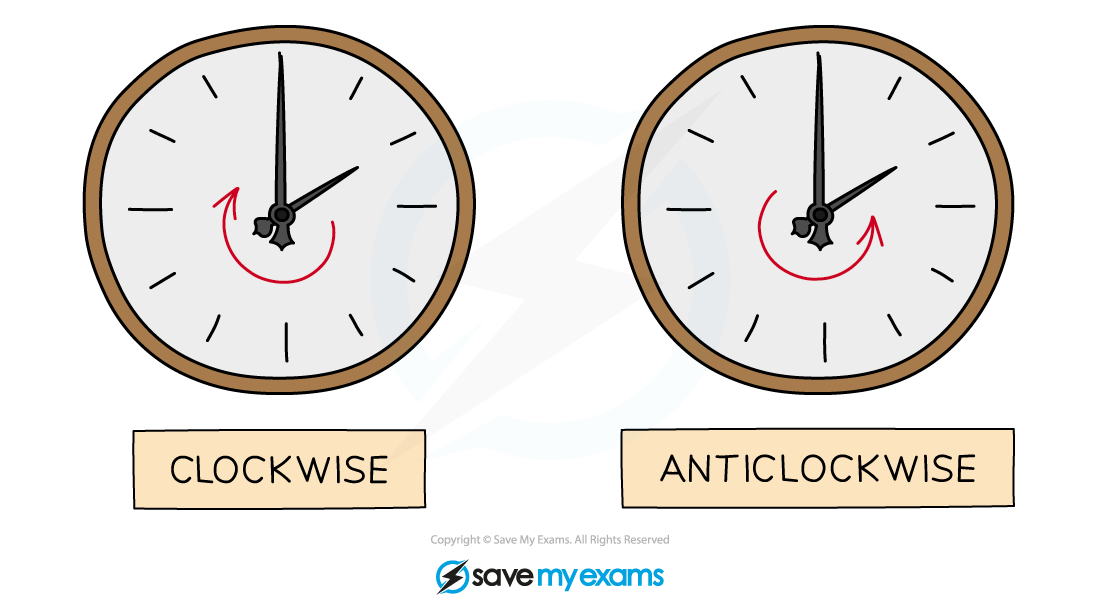
How do I rotate a shape?
-
STEP 1
Place the tracing paper over page and draw over the original object
-
STEP 2
Place the point of your pencil on the centre of rotation
-
STEP 3
Rotate the tracing paper by the given angle in the given direction
-
The angle will be 90°, 180° or 270°
-
-
STEP 4
Carefully draw the image onto the coordinate grid in the position shown by the tracing paper
How do I describe a rotation?
-
To describe a rotation, you must:
-
State that the transformation is a rotation
-
State the centre of rotation
-
State the angle of rotation
-
This will be 90°, 180° or 270°
-
-
State the direction of rotation
-
Clockwise or anti-clockwise
-
A direction is not required if the angle is 180°
-
90° clockwise is the same as 270° anti-clockwise
-
-
-
To find the centre of rotation:
-
If the rotation is 90° or 270°
-
Use tracing paper and start on the original shape
-
Try a point as the centre and rotate the original shape
-
If the rotated shape matches the image then that point is the centre
-
Otherwise keep picking points until one works
-
-
If the rotation is 180°
-
Draw lines connecting each vertex on the original shape with the corresponding vertices on the image
-
These lines will intersect at the centre of rotation
-
-
How do I reverse a rotation?
-
If a shape has been rotated to a new position, you can perform a single transformation to return the shape to its original position
-
A rotation can be reversed by simply reversing the direction of rotation
-
The angle of rotation is the same
-
The centre of rotation is the same
-
-
For a shape rotated by 45º in a clockwise direction about the point (0, 3)
-
The reverse transformation is
-
a rotation of 45º
-
in an anti-clockwise direction
-
about the point (0, 3)
-
-
Examiner Tips and Tricks
-
When you first go into the exam room, make sure there is some tracing paper on your desk ready for you
-
If there isn’t ask for some before the exam begins
-
-
Draw an arrow facing up on your tracing paper
-
The arrow will be facing left or right when you have turned 90° or 270°
-
The arrow will be facing down when you have turned 180°
-
-
Double-check that you have copied the rotated image into the correct position
-
Put the tracing paper over the original object and rotate it again to see that it lines up with your image
-
Worked Example
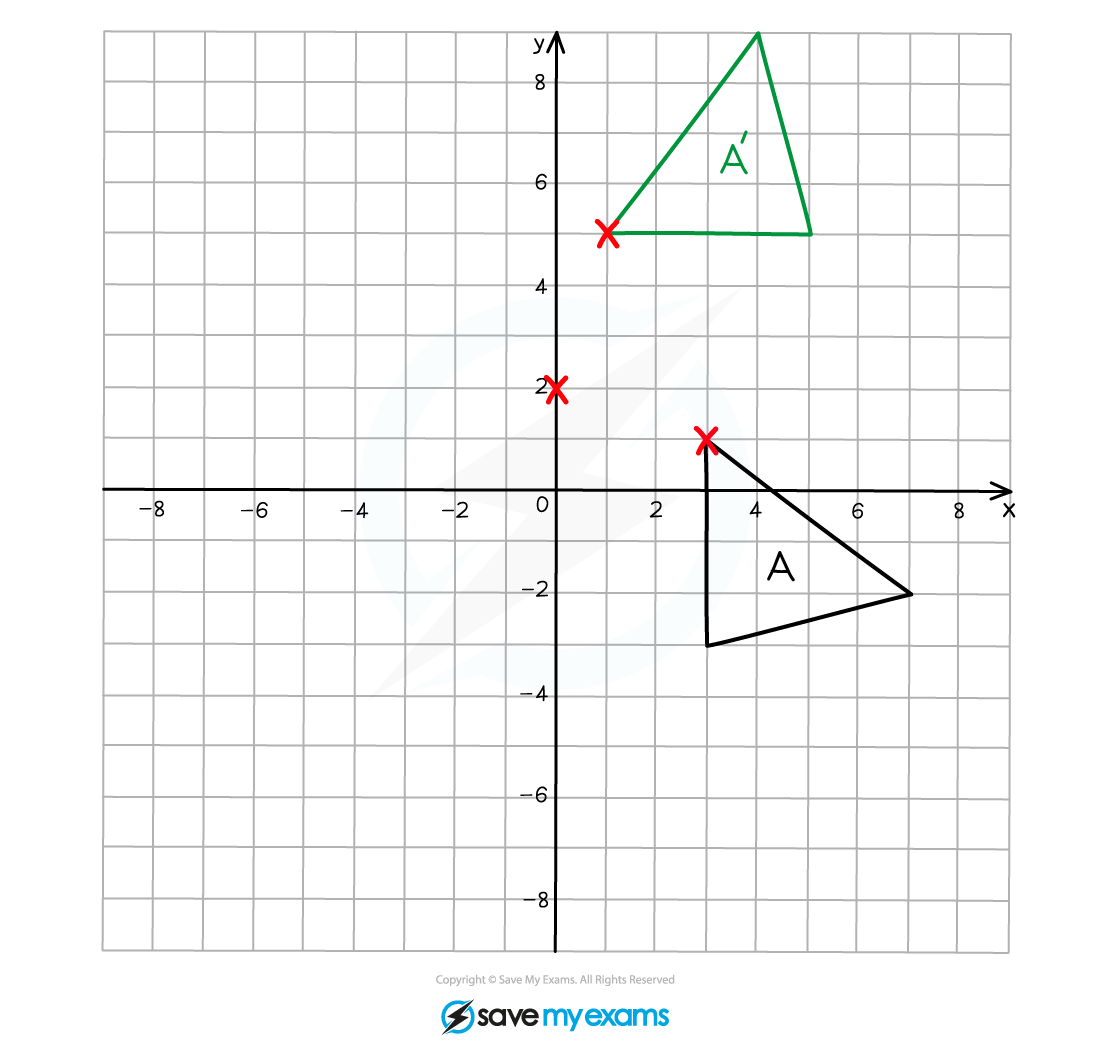
(a) On the grid below rotate shape A by 90° anti-clockwise about the point (0, 2).
Label your answer A’.
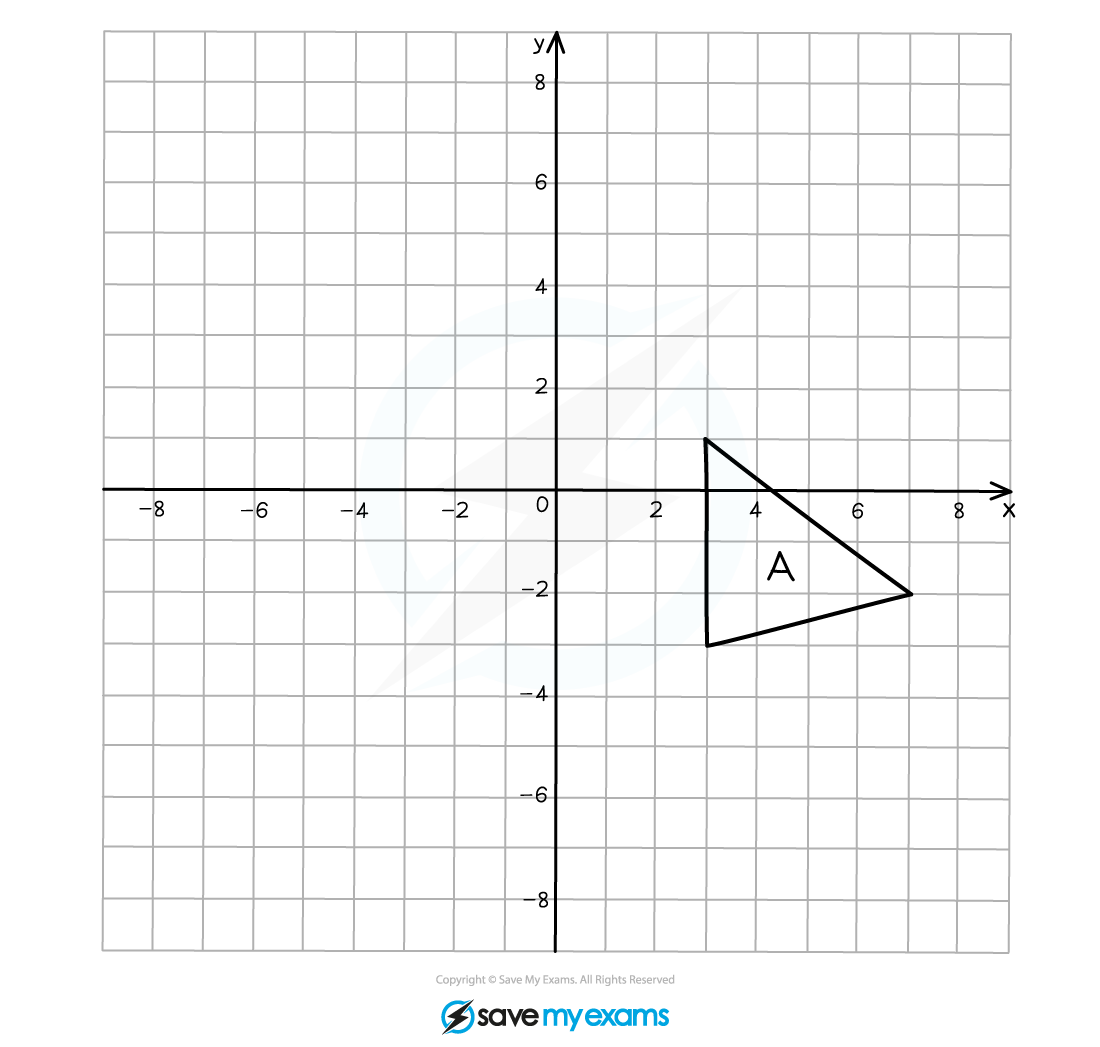
Using tracing paper, draw over the original object and mark one vertex.
Mark on the centre of rotation.
Draw an arrow pointing vertically upwards on the paper.
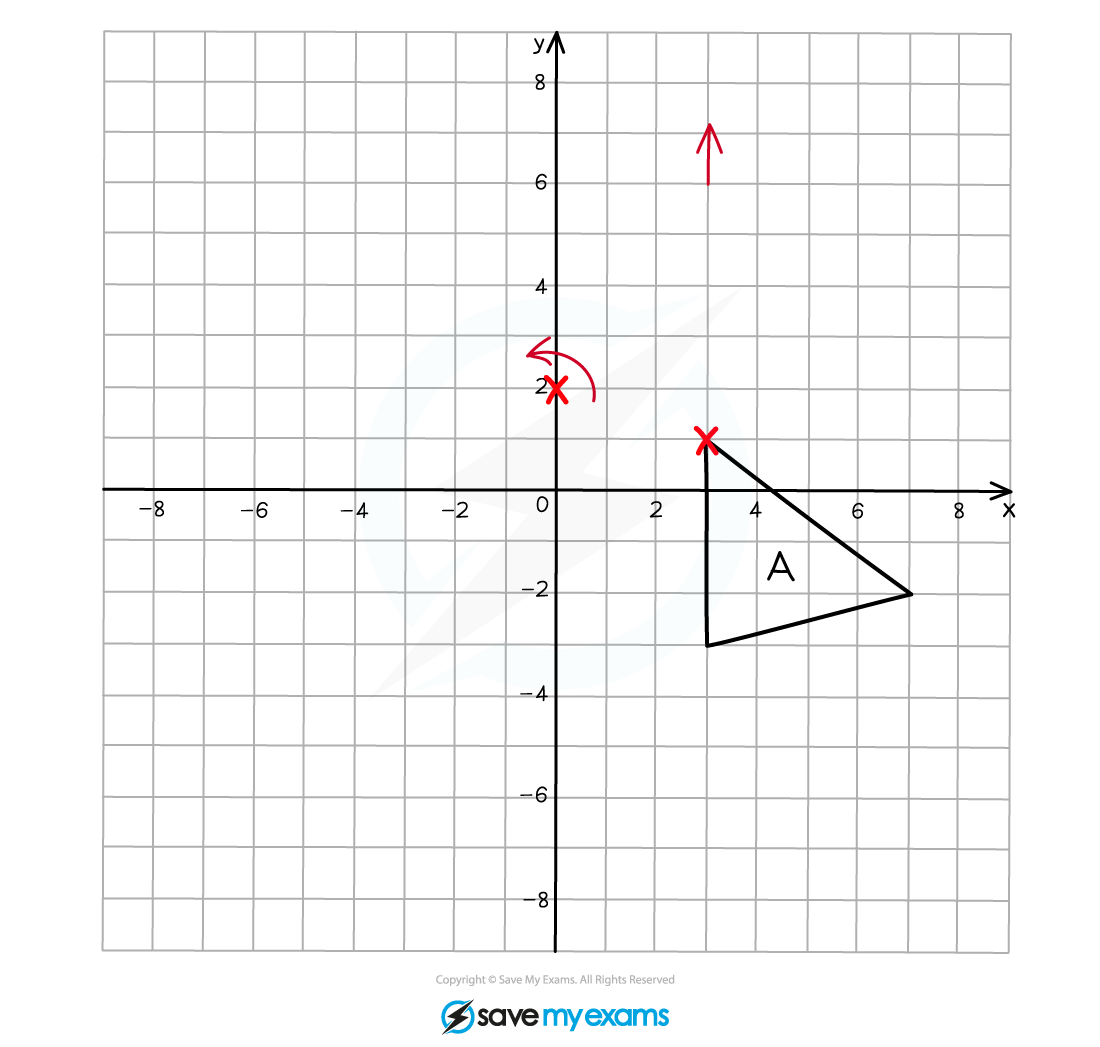
With your pencil fixed on the point of rotation, rotate the tracing paper 90o anti-clockwise, the arrow that you drew should now be pointing left.
Make a mental note of the new coordinates of the vertex that you marked on your tracing paper.
Draw the new position of this vertex onto the grid.
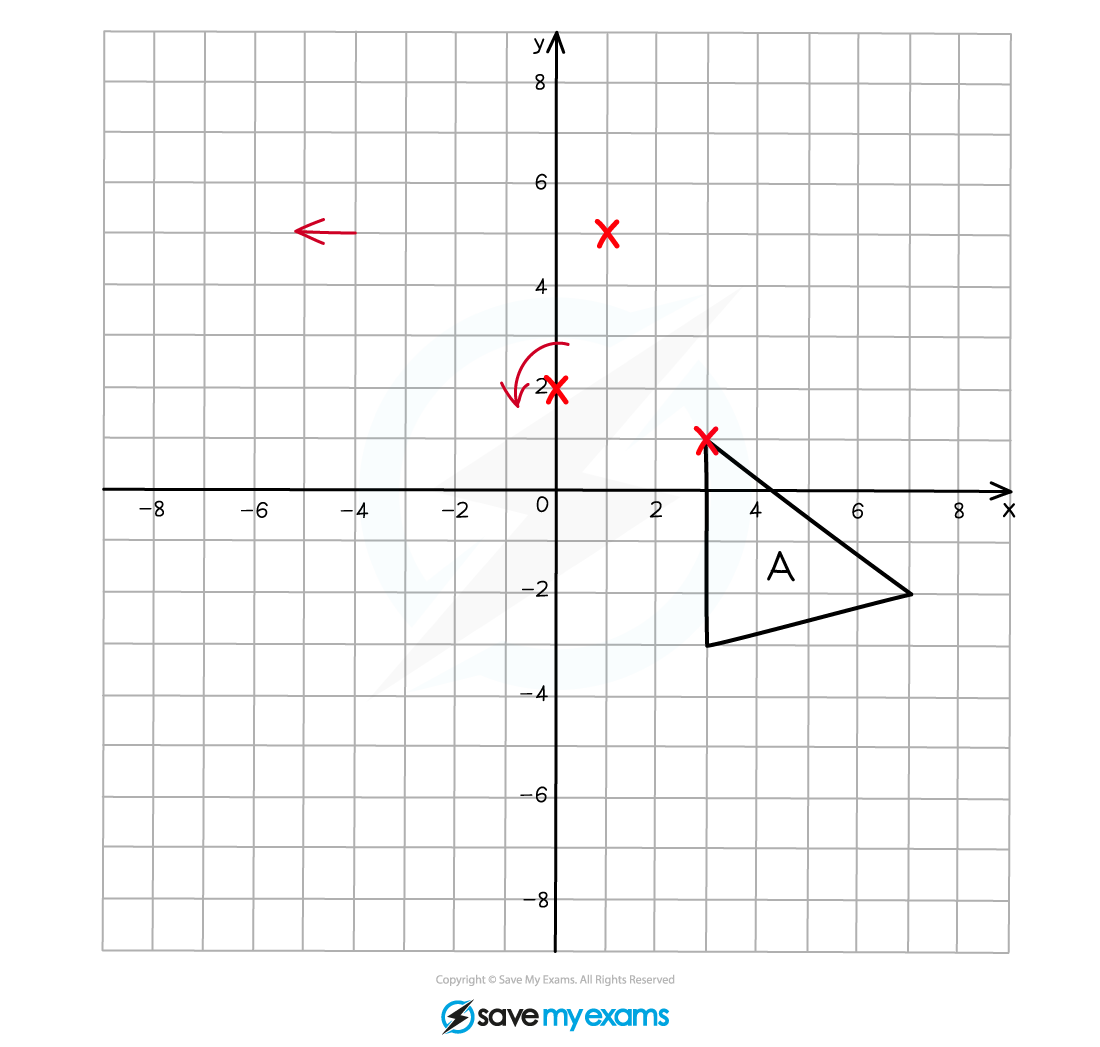
Repeat this process for the other two vertices on the triangle.
Connect the vertices together to draw the rotated image.
(b) Describe fully the single transformation that creates shape B from shape A.
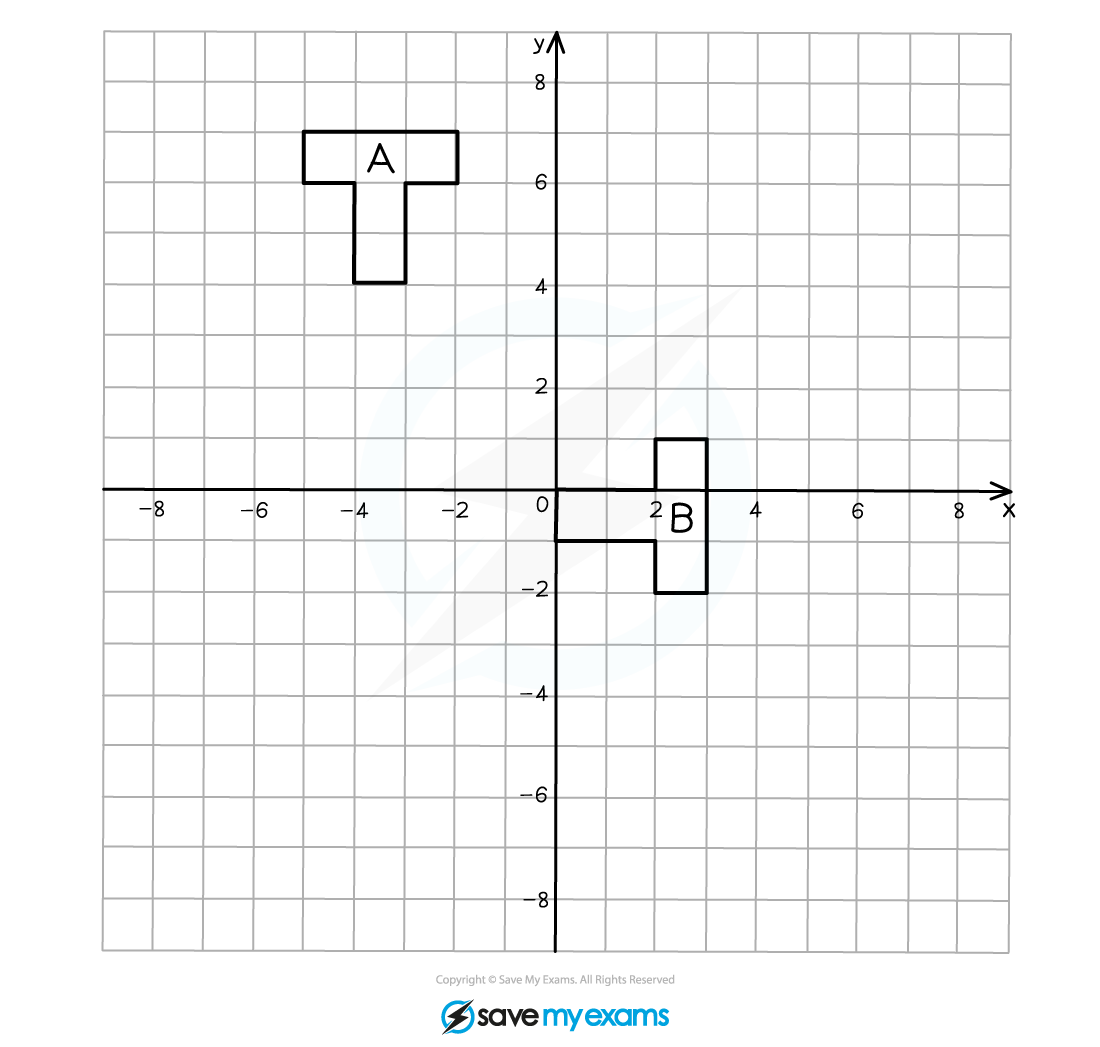
You should be able to see that the object has been rotated 90o clockwise (or 270o anti-clockwise).
You are likely to be able to see roughly where the centre of rotation is but it may take a little time to find its position exactly.
Responses