
Computer Science GCES OCR
-
Cpu Architecture Performance And Embedded Systems Ocr5 主题
-
Primary And Secondary Storage Ocr6 主题
-
Data Storage And Compression Ocr12 主题
-
Units Of Data Storage Ocr
-
Processing Binary Data Ocr
-
Data Capacity And Calculating Capacity Requirements Ocr
-
Converting Between Denary And Binary Ocr
-
Binary Addition Ocr
-
Converting Between Denary And Hexadecimal Ocr
-
Converting Between Binary And Hexadecimal Ocr
-
Binary Shifts Ocr
-
Representing Characters Ocr
-
Representing Images Ocr
-
Representing Sound Ocr
-
Compression Ocr
-
Units Of Data Storage Ocr
-
Networks And Topologies Ocr6 主题
-
Wired And Wireless Networks Protocols And Layers Ocr6 主题
-
Identifying And Preventing Threats To Computer Systems And Networks Ocr2 主题
-
Operating Systems And Utility Software Ocr2 主题
-
Ethical Legal Cultural And Environmental Impact Ocr2 主题
-
Computational Thinking Searching And Sorting Algorithms Ocr3 主题
-
Designing Creating And Refining Algorithms Ocr5 主题
-
Programming Fundamentals And Data Types Ocr5 主题
-
Additional Programming Techniques Ocr7 主题
-
Defensive Design And Testing Ocr6 主题
-
Boolean Logic Diagrams Ocr2 主题
-
Programming Languages And Integrated Development Environments Ides Ocr3 主题
-
The Exam Papers Ocr2 主题
-
Structuring Your Responses Ocr3 主题
How To Answer Trace Table Questions Ocr
Exam code:J277
How do I answer an OCR GCSE (9-1) Computer Science trace table question?
What is a trace table?
-
Trace tables are used to follow the values of variables as a program runs
-
These questions test your ability to simulate code line by line and accurately record outputs
Examiner Tips and Tricks
-
You must read the code carefully and simulate it exactly as a computer would
-
Use a pencil and annotate each step
-
The most common mistake is skipping or misreading a line
What you need to know
-
You may be asked to complete a trace table, explain a trace table, or spot errors in output
-
These questions are normally worth 3–6 marks
-
Most commonly appear in questions involving iteration, selection, and arrays/lists
-
In most cases, the structure of the table is provided, your task is to complete the missing values
Command words to look out for
|
Command word |
What it means |
|---|---|
|
Complete |
Fill in the table with correct values |
|
State |
Give the value/output/result (usually a single word or number) |
|
Explain |
Say why something happens or changes in the program |
|
Identify |
Spot where something goes wrong or doesn’t match expectations |
How to tackle a trace table question
Follow these steps to answer trace table questions accurately:
-
Read the code carefully
Understand what each line does
Look out for loops, IF statements, and variable changes
-
Use the trace table provided
Use the headings and row count to guide how many iterations or steps are needed -
Work line by line
Simulate the program in your head or on paperUpdate each variable after every change
-
Watch out for variable resets
Variables declared inside loops often reset every time, don’t carry the wrong value across iterations -
Show the final output clearly
If you’re asked for the output, make sure it’s written exactly as it would appear on screen
Worked example
|
Question |
||||||||||||||||||||||||||||||||||||
|---|---|---|---|---|---|---|---|---|---|---|---|---|---|---|---|---|---|---|---|---|---|---|---|---|---|---|---|---|---|---|---|---|---|---|---|---|
|
This algorithm calculates the number of points a student gets for the distance they throw in the javelin: Complete the trace table for the algorithm when a student in year 10 throws a distance of 14.3 You may not need to use all the rows in the table
|
||||||||||||||||||||||||||||||||||||
|
||||||||||||||||||||||||||||||||||||
|
||||||||||||||||||||||||||||||||||||
|
||||||||||||||||||||||||||||||||||||
|
||||||||||||||||||||||||||||||||||||
|
||||||||||||||||||||||||||||||||||||
|
14.3 |
|||||||||||||||||||||||||||||||||||
|
10 |
|||||||||||||||||||||||||||||||||||
|
No |
|||||||||||||||||||||||||||||||||||
|
||||||||||||||||||||||||||||||||||||
|
Yes |
|||||||||||||||||||||||||||||||||||
|
score = 2 |
|||||||||||||||||||||||||||||||||||
|
||||||||||||||||||||||||||||||||||||
|
||||||||||||||||||||||||||||||||||||
|
||||||||||||||||||||||||||||||||||||
|
The score is 4 |
|||||||||||||||||||||||||||||||||||
|
Final answer |
||||||||||||||||||||||||||||||||||||
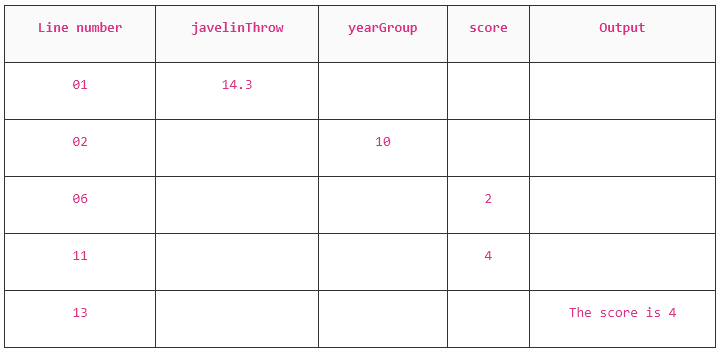 |
||||||||||||||||||||||||||||||||||||
Responses