
Computer Science GCES OCR
-
Cpu Architecture Performance And Embedded Systems Ocr5 主题
-
Primary And Secondary Storage Ocr6 主题
-
Data Storage And Compression Ocr12 主题
-
Units Of Data Storage Ocr
-
Processing Binary Data Ocr
-
Data Capacity And Calculating Capacity Requirements Ocr
-
Converting Between Denary And Binary Ocr
-
Binary Addition Ocr
-
Converting Between Denary And Hexadecimal Ocr
-
Converting Between Binary And Hexadecimal Ocr
-
Binary Shifts Ocr
-
Representing Characters Ocr
-
Representing Images Ocr
-
Representing Sound Ocr
-
Compression Ocr
-
Units Of Data Storage Ocr
-
Networks And Topologies Ocr6 主题
-
Wired And Wireless Networks Protocols And Layers Ocr6 主题
-
Identifying And Preventing Threats To Computer Systems And Networks Ocr2 主题
-
Operating Systems And Utility Software Ocr2 主题
-
Ethical Legal Cultural And Environmental Impact Ocr2 主题
-
Computational Thinking Searching And Sorting Algorithms Ocr3 主题
-
Designing Creating And Refining Algorithms Ocr5 主题
-
Programming Fundamentals And Data Types Ocr5 主题
-
Additional Programming Techniques Ocr7 主题
-
Defensive Design And Testing Ocr6 主题
-
Boolean Logic Diagrams Ocr2 主题
-
Programming Languages And Integrated Development Environments Ides Ocr3 主题
-
The Exam Papers Ocr2 主题
-
Structuring Your Responses Ocr3 主题
Arrays Ocr
Exam code:J277
1-Dimensional Arrays
What is an array?
-
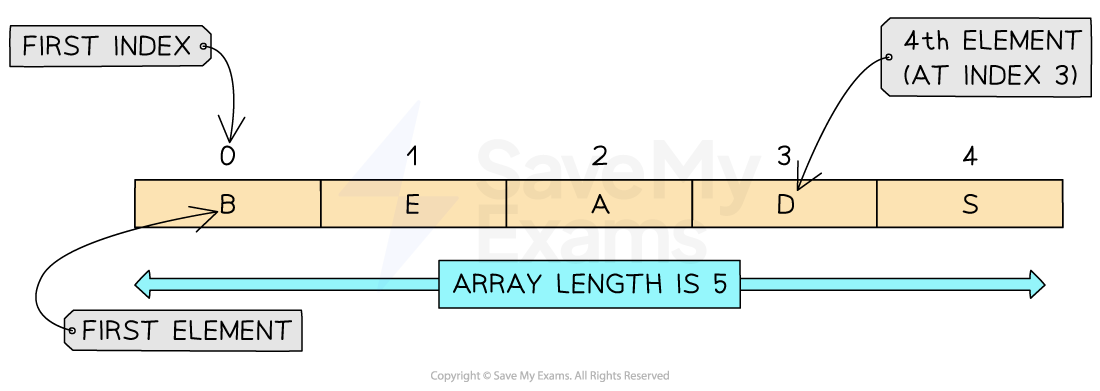
An array is an ordered, static set of elements in a fixed size memory location
-
An array can only store 1 data type
-
A 1D array is a linear array
-
Indexes start at 0, known as zero indexed
|
Concept |
OCR exam reference |
Python |
Description |
|---|---|---|---|
|
Create blank 1D array |
|
|
Creates an array with 5 elements (0–4), each initialised to 0 |
|
Create empty array |
n/a |
|
Creates an empty list (no elements) |
|
Assignment |
|
|
Assigns the colour “Red” to index 4 (5th element) |
Example in Python
Creating a one-dimensional array called ‘array’ which contains 5 integers.
-
Create the array with the following syntax:
array = [1, 2, 3, 4, 5] -
Access the individual elements of the array by using the following syntax:
array[index] -
Modify the individual elements by assigning new values to specific indexes using the following syntax:
array[index] = newValue -
Use the len function to determine the length of the array by using the following syntax:
len(array) -
In the example the array has been iterated through to output each element within the array. A for loop has been used for this
|
|
2-Dimensional Arrays
What is a 2-dimensional array?
-
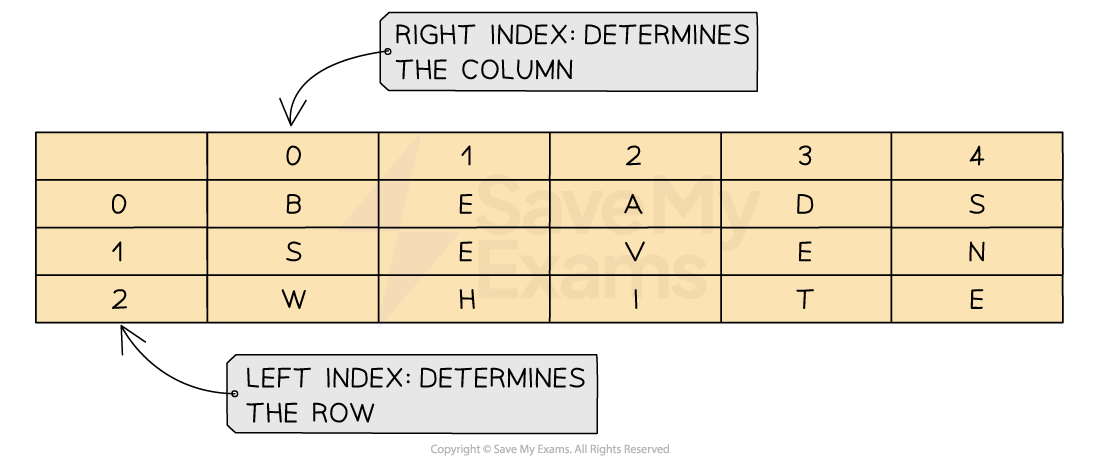
A 2D array extends the concept on a 1D array by adding another dimension
-
A 2D array can be visualised as a table with rows and columns
-
When navigating through a 2D array you first have to go down the rows and then across the columns to find a position within the array
|
Concept |
OCR exam reference |
Python |
Description |
|---|---|---|---|
|
Create blank 2D array |
|
|
Creates a 3×3 2D array with all values set to |
|
Create populated 2D array |
|
|
Creates a 2D array with names in row 0 and scores in row 1 |
|
Assign a value |
|
|
Replaces |
|
Access a value |
|
|
Retrieves the value at row 2, column 2 |
Example in Python
|
|
Examiner Tips and Tricks
In the exam, the question will always give an example to demonstrate which order the array is being read from.
Some questions can be X,Y and others can be Y, X. Always refer to the example before giving your answer!
Worked Example
A parent records the length of time being spent watching TV by 4 children
Data for one week (Monday to Friday) is stored in a 2D array with the identifier minsWatched.
The following table shows the array
|
|
Quinn |
Lyla |
Harry |
Elias |
|
|
0 |
1 |
2 |
3 |
||
|
Monday |
0 |
34 |
67 |
89 |
78 |
|
Tuesday |
1 |
56 |
43 |
45 |
56 |
|
Wednesday |
2 |
122 |
23 |
34 |
45 |
|
Thursday |
3 |
13 |
109 |
23 |
90 |
|
Friday |
4 |
47 |
100 |
167 |
23 |
Write a line of code to output the number of minutes that Lyla watched TV on Tuesday [1]
Write a line of code to output the number of minutes that Harry watched TV on Friday [1]
Write a line of code to output the number of minutes that Quinn watched TV on Wednesday [1]
Answers
-
print(minsWatched[1,1]orprint(minsWatched[1][1] -
print(minsWatched[2,4]orprint(minsWatched[2][4] -
print(minsWatched[0,2]orprint(minsWatched[0][2]
Responses