
Computer Science GCES AQA
-
Representing Algorithms Aqa4 主题
-
Efficiency Of Algorithms Aqa1 主题
-
Searching Algorithms Aqa3 主题
-
Sorting Algorithms Aqa3 主题
-
Data Types Aqa1 主题
-
Programming Concepts Aqa5 主题
-
Arithmetic Relational And Boolean Operations Aqa1 主题
-
Data Structures Aqa3 主题
-
String Manipulation Aqa1 主题
-
Random Number Generation Aqa1 主题
-
Structured Programming Aqa2 主题
-
Robust And Secure Programming Aqa4 主题
-
Number Bases Aqa2 主题
-
Converting Between Number Bases Aqa3 主题
-
Units Of Information Aqa9 主题
-
Hardware And Software Aqa4 主题
-
Boolean Logic Aqa3 主题
-
Programming Languages And Translators Aqa2 主题
-
Cpu Architecture Performance And Embedded Systems Aqa4 主题
-
Memory Aqa2 主题
-
Secondary Storage Aqa3 主题
-
Fundamentals Of Computer Networks Aqa8 主题
-
Fundamentals Of Cyber Security Aqa1 主题
-
Methods Of Preventing Cyber Security Threats Aqa1 主题
-
Relational Databases Aqa2 主题
-
Ethical Legal And Environmental Impacts Aqa2 主题
Structured Query Language Sql Aqa
Exam code:8525
Retrieving Data Using SQL
What is SQL?
-
SQL (Structured Query Language) is a programming language used to interact with a DBMS.
-
The use of SQL allows a user to:
-
Select data (flat file)
-
Select data (relational)
-
Order data
-
Insert data
-
Update data
-
Delete records
-
Selecting data commands (flat file)
|
Command |
Description |
Example |
|---|---|---|
|
SELECT |
Retrieves data from a database table |
SELECT * FROM users; SELECT name, age |
|
FROM |
Specifies the tables to retrieve data from |
SELECT name, age FROM users; |
|
WHERE |
Filters the data based on a specified condition |
SELECT * FROM users |
|
AND |
Combines multiple conditions in a WHERE clause |
SELECT * FROM users |
|
OR |
Retrieves data when at least one of the conditions is true |
SELECT * FROM users |
|
WILDCARDS |
‘*‘ and ‘%‘ symbols are used for searching and matching data |
SELECT * FROM users; SELECT * FROM users WHERE name LIKE ‘J%’; |
|
Nested SELECT |
A select within another select statement (nested). A mini select within the main one |
SELECT * FROM users WHERE age > (SELECT AVG(age) FROM users); (retrieves users with an age greater than the average age) |
|
ORDER BY |
How data is organised (sorted) when it is retrieved |
SELECT Forename, Lastname FROM Students (retrieves only the forename and lastname of all students from the students table who have a studentID of less than 10 and displays in ascending order by lastname and forename) |
Examples
-
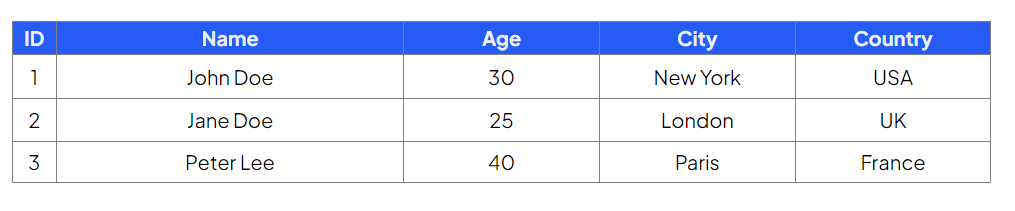
Select all the fields from the Customers table
Command:

Output:
-
Select the ID, name & age of customers who are older than 25
Command:

Output:

-
Select the name and country of customers who are from a country that begins with ‘U’
Command:

Output:

-
Select all fields of customers who are from ‘London’ or ‘Paris’
Command:
Responses